hardware · xteink x3
Xteink X3, the small one that rides on a phone
Our firmware runs on the X3. We do not call it supported yet, and this page says exactly why. It is the same ESP32-C3 build as the plain X4, one real X3 has been on our desk since 9 September 2026, and it boots, mounts its card, draws the map and takes a position over Bluetooth. What it also does is draw its own button hints off the bottom of the screen. That is the gap between running and supported, and it is the whole difference between a device we measure on and a device we would tell a stranger to buy.
Flash it from the browser What we measured What it gets wrong What is still open
What the device is
The X3 is Xteink’s 3.7″ e-ink reader, the smallest of the line. Same chip as the plain X4, same pinout, a different panel and a different set of chips on the I2C bus. No frontlight, no touch layer, physical buttons, and no USB socket: data comes out on the pogo pins through the dongle in the box.
- Panel
- 792×528 native, which the renderer drives as 528×792 portrait. 3.7″, about 257 ppi against the X4’s 218
- Controller
- a UC8253 or a UC8279. The firmware asks the panel at boot; nobody has read which one our unit has
- Frontlight
- none. A daylight device
- Touch
- none. Physical buttons only
- SoC
- ESP32-C3 rev v0.4, single core at 160 MHz, WiFi and Bluetooth 5 LE
- Memory
- 245 kB of heap in total, 127 kB free at the home screen, 16 MB flash
- On the I2C bus
- a BQ27220 fuel gauge, a clock and an IMU. The X4 has none of them
- Storage
- microSD, for map tiles
- USB
- no socket. Data comes out on the pogo pins, and they do carry data
Chip, revision, flash size and the USB identity were read off our own unit over the cable, along with the 16 MB stock image we took before writing anything of ours. Panel geometry is the device’s own framebuffer: a screenshot comes back 52,272 bytes, which is 528 × 792 ÷ 8 exactly. Diagonal and density are the vendor’s numbers. Battery capacity, weight and price we have not measured.
One build, two readers
The X4 and the X3 are the same machine with a different screen on it, so they run the same binary. The firmware works out which one it is on at boot: it probes for the chips only an X3 carries, twice, scores the hits, and picks its profile from that. No build flag, no separate download.
On the real device this printed Hardware detect: X3 with no help from us,
first try. The part worth more than the log line is what followed it: the position marker
landed 4 px from the centre of a 528 px panel. Until that day the code that scales the
marker to the screen had only ever been checked in a simulator, and the number it
replaced would have put the marker 34 px off centre here.
What we measured on it
One session, 9 September 2026, on a development build. Everything here came off the device’s own log or its own framebuffer.
| What | Number |
|---|---|
| Free heap, home screen | 126.9 kB of 245.2 kB |
| Free heap, map open with Bluetooth up | 51.2 kB |
| Free heap during a render | 33.7 kB, largest single block 22.5 kB |
| One map frame | 1,257 ms to build it, of which 505 ms was the SD card, then 1,530 ms to put it on the panel |
| Tiles over Bluetooth | about 6 kB/s, from three transfers |
| Screenshot | 52,272 bytes, four grabs, none truncated |
The heap line is the one that decides things. Starting the Bluetooth stack alone costs 57.1 kB here, and a render runs with 33.7 kB free. That is the budget every memory rule in this project was written against, and it is why the X4 Pro’s 172 kB felt like a different product rather than a faster one.
The Bluetooth number is a constraint on the product, not a detail. At 6 kB/s a 500 kB tile takes over a minute and a half, and that dominated the whole test session. Tiles belong on the card before a trip; the radio is for the ones you did not think to bring.
One render is one sample. It says the order of magnitude and nothing about how much it varies.
The map also fetched a missing tile by itself: the device asked for it over Bluetooth, a stand-in for the phone fetched it and pushed it back, and the frame redrew with real data. The X3 has no receiver of its own, so the position came the same way. That is the arrangement this whole product describes, seen working on the smallest screen we own.
What it gets wrong on this panel
Every layout number in the firmware was hand-tuned against a 480×800 X4. This panel is 528×792, and three things were drawn in the wrong place because of it. None of them is visible on an X4. One is half fixed, the other two are still there.
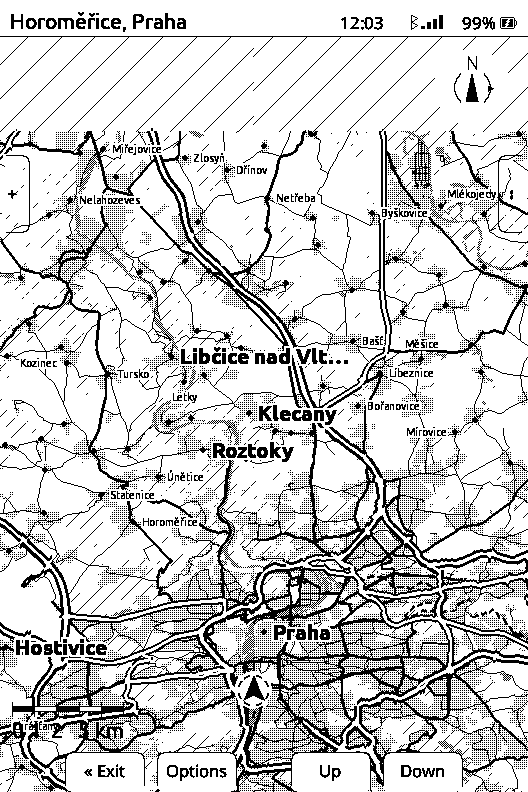
- The button hints run off the bottom edge. Measured on the framebuffer above: ink reaches row 791 of 791, so the boxes have no bottom border at all, and on the map screen it reaches columns 0 and 527 as well, which hangs the side boxes over both edges. The X3 is not missing from that code, it has its own set of positions. They are simply the wrong numbers.
- The scale bar shared pixels with the place name. Bottom left, the bar’s ticks crossed the letters, as in the frame above. Since 15 September 2026 a place name can no longer be placed on the bar, on any panel. An off-screen pin’s distance label still lands under it.
- The north arrow overlaps the right hint box. Same cause, same 528×792 layout.
The deeper fix is not six new numbers. Six separate things in the firmware ask “which device am I” when what they mean is “how big is this screen”, and a third panel size is what made that expensive.
Why it may be the city walker’s device
The X3 is sold to ride on the back of a phone, on a magnetic mount. For most of what we build that is irrelevant. For walking a city it may be the whole answer.
The position comes from the phone over Bluetooth, and every description of that arrangement assumes the phone is in a pocket, which is its most awkward property. Stuck to the phone it is one object in one hand, the radio link is at zero range, and the thing that supplies the position is the thing the map is attached to. Two costs, both real: this is the smallest panel we own, which is exactly where city label density is worst, and there is no light behind the glass, while sightseeing carries on after dark.
Whether that magnetic mount is a vendor accessory or an ordinary third-party pad, and what it weighs, we have not established.
What is still open
The X3 column of our own acceptance checklist is mostly empty, and that list is what decides whether a device gets called supported. Until it is walked with the device’s own buttons, rather than with commands over the cable, this page will keep saying not yet.
- The panel controller of this unit. A UC8253 or a UC8279, and the boot log that would say which was captured too late to hold the line.
- The fuel gauge. Unread, and it is the only instrument this project has for measuring its own power draw from inside a sealed device.
- The panel in direct sun. A refresh under strong daylight can come back blank on the X4’s panel. On this panel no blank refresh has been seen in ordinary daylight use since September 2026. That is observed, not measured: the stencil test has not been run here.
- Grey levels, more than one zoom, a long session without a restart. All three are checklist rows and all three are untried here.
Where the firmware is
The same four files as the plain X4, because it is the same build. Nothing X3-specific to download.
- In the browser, over USB: the flasher page. Desktop Chrome, Edge or Opera. It takes a 16 MB backup of Xteink’s own firmware before it writes anything, and on this device that backup is the only way back.
- The release itself: explorink-v0.2.2 on GitHub, with checksums next to the files.
- With esptool: the install page has the four offsets and the command. Plug the pogo dongle in first: with no USB socket on the device, without it the computer finds nothing at all.
The download and the tested build are the same thing: 0.2.2 is the exact image flashed and verified on our X3 on 1 Nov 2026, hash for hash. It boots, mounts the card, takes a position over Bluetooth and draws a town with street names. It is still alpha, replacing the reader’s original firmware, which no vendor download will put back.
Where it sits next to the others
The plain X4 is where most of our numbers came from, and it was discontinued in August 2026. The X4 Pro is the device we design against, because it has a light behind the glass. The X3 is the one that is still on sale, still on our desk, and still the smallest screen anyone would try this on. The hardware page has the comparison, the X4 findings have the panel and refresh numbers this device inherits, and the X4 Pro page has the other end of the line.